Back to School Pencils Design Pack
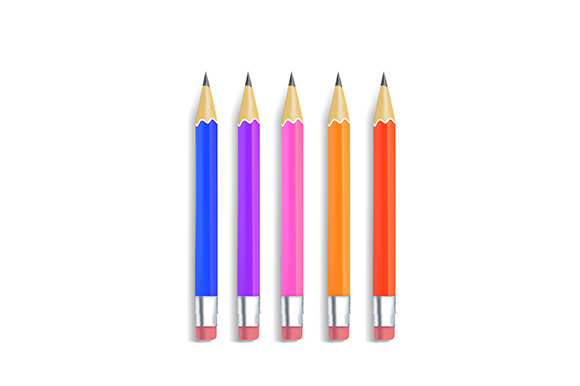
When you think about preparing for a new school year, pencils are probably one of the first things that come to mind. They are simple, practical, and universally recognized as a symbol of learning and creativity. But what if you could use that same iconic imagery in your own projects, marketing materials, or educational content without having to design everything from scratch? That is exactly what the Back to School Pencils design resource offers. This pack, delivered as a single ZIP folder containing one JPG file and one EPS file, features four distinct pencil illustrations designed around a back to school theme. Whether you are a teacher sprucing up a classroom flyer, a small business owner promoting a seasonal sale, or a blogger creating engaging visuals for your audience, this set gives you a ready-to-use starting point that saves time and effort.
What Makes This Pencil Set Useful
At its core, this pack is about convenience and flexibility. The four pencils are illustrated in a style that fits naturally with back to school messaging, but they are versatile enough to work in many other contexts as well. The JPG file is a standard image format that you can open on almost any device, add to a document, or upload directly to social media. The EPS file, on the other hand, is a vector format that allows you to edit colors, resize without losing quality, and customize individual elements. This means you are not stuck with a static image. You can change the pencil colors to match your brand, adjust the size for a banner or a business card, or combine them with other graphics in your design software.
For someone who is new to working with design files, the combination of JPG and EPS is especially helpful. You can use the JPG right away for quick tasks, and when you feel ready to explore more advanced editing, the EPS file gives you that room to grow. The pack eliminates the need to hunt for separate images or struggle with incompatible formats. Everything is organized in one folder, so you can find what you need without digging through your downloads.
Who Benefits from This Resource
This pencil set is designed for a wide range of people, and its appeal comes from its simplicity and practicality. Educators, for instance, can use these illustrations in classroom newsletters, bulletin board decorations, or homework assignment headers. A teacher preparing a welcome back packet for students might place one of the pencils next to a list of supplies or use them as visual cues on a schedule. For small business owners, especially those running a back to school sale, these pencils can appear on email campaigns, social media posts, or even printed signage. Imagine a local bookstore or stationery shop promoting discounts on notebooks and pens. The pencil imagery immediately signals the season and makes the promotion feel timely and relevant.
Freelancers and bloggers who create content around education, parenting, or organization can also make good use of this pack. A blogger writing a guide on how to set up a homework station might include the pencil graphic to break up text and add visual interest. Marketers putting together a seasonal ad campaign can drop the EPS file into their design software and adjust colors to align with their brand palette. Even hobbyists working on personal projects like scrapbooking or digital journaling might find these pencils useful as decorative elements.
Practical Ways to Use the Pencil Illustrations
One of the strengths of this pack is how easily it fits into both digital and print contexts. On the digital side, the JPG file can be inserted directly into a blog post, a social media graphic, or an email header. You do not need any special software to use it. If you are running a back to school sale on your online store, you could place one of the pencil images next to a product photo or use it as a divider between sections of a promotion. The EPS file, meanwhile, is ideal for projects that require more control. If you want to create a custom flyer that matches your exact color scheme, you can open the EPS in a vector editing program like Adobe Illustrator or Inkscape and make adjustments freely.
Print applications are equally straightforward. A school PTA member designing a flyer for a fundraiser could use the JPG at full resolution to ensure a clean print. A small business owner printing in-store signs for a back to school sale can scale the EPS up or down without worrying about pixelation. Because the pencils are illustrated in a clean style, they work well on both white backgrounds and colored paper. You can also combine them with other design elements, such as text overlays or additional icons, to create a complete layout.
Getting Started Even If You Have No Design Experience
If you have never worked with an EPS file before, do not let that intimidate you. The pack is structured so that you can start with the JPG immediately. Open it, crop it, resize it, or add it to a document just like any photo. When you are curious about editing, the EPS file is there for you to explore. There are many free online tutorials that walk through basic vector editing, and the skills you learn can be applied to other design projects later on. The key is that you are not locked into one format. You have options, and that flexibility is what makes this pack valuable for both beginners and more experienced creators.
For professionals who already use design software regularly, the EPS file is a time saver. Instead of recreating a pencil illustration from scratch, you have a clean vector base that you can customize in minutes. You might adjust the thickness of the pencil lines, change the color of the eraser, or add a subtle shadow effect. Because vector files maintain their quality at any size, you can use the same illustration on a website banner and on a large poster without needing separate files.
What to Consider Before Using This Pack
As with any design resource, it helps to think about your specific needs before you start. The pack contains four pencils, all illustrated with a back to school theme in mind. If you need a larger variety of colors or styles, this set gives you a focused collection that works well for seasonal promotions and educational content. The JPG file is ready for immediate use, but if you plan to edit it extensively, the EPS file is where you will find the most flexibility. Make sure you have software that can open EPS files, such as Adobe Illustrator, CorelDRAW, or free alternatives like Inkscape. If you only need the JPG, no special software is required.
Another point to consider is the resolution of the JPG file. For digital use, standard resolution is usually sufficient, but if you plan to print the image at a large size, you may want to check the dimensions first. With the EPS file, resolution is not a concern because vectors scale indefinitely. This makes the EPS a safer choice for print projects where size might change during the design process.
Staying Organized and Making the Most of the Folder
The ZIP folder keeps everything together in one place, which is helpful for staying organized. Once you download it, you can extract the files to a folder on your computer named something like “Back to School Pencils” so they are easy to find later. If you are working on multiple projects, you might create subfolders for different uses, such as “Social Media,” “Print,” and “Web,” and copy the relevant file into each one. This small habit saves time when you need to locate a graphic quickly.
You can also combine this pack with other design assets you already own. If you have a collection of school-themed icons, borders, or fonts, the pencils can complement them nicely. The illustrations are straightforward enough that they do not clash with busier designs, yet they have enough character to stand alone if needed.
Why This Pack Appeals to Different Audiences
The appeal of the Back to School Pencils pack lies in its balance of simplicity and utility. For a busy teacher, it means one less thing to create from scratch. For a marketer, it means a consistent visual element that can be adapted across campaigns. For a beginner, it means a safe entry point into working with different file formats. The pack does not promise to replace a full design library, but it delivers exactly what it says: four pencil illustrations in two formats, organized and ready to use.
If you are someone who values efficiency and likes having reliable assets on hand, this pack fits naturally into your workflow. It supports common goals like creating promotional materials, enhancing educational content, and maintaining a cohesive visual theme during the back to school season. And because the files are separate, you can use the JPG for quick projects today and save the EPS for when you have time to explore more customization.
Ultimately, the best design resources are the ones that remove friction. You do not have to worry about file compatibility, search for the right image, or learn complex software just to get started. Everything you need is in that one folder, and the choice of format is yours based on the task at hand. Whether you are printing a flyer for a back to school sale, designing a digital banner for a blog, or creating a simple handout for a classroom, these pencils offer a straightforward, professional-looking solution that respects your time and skill level.