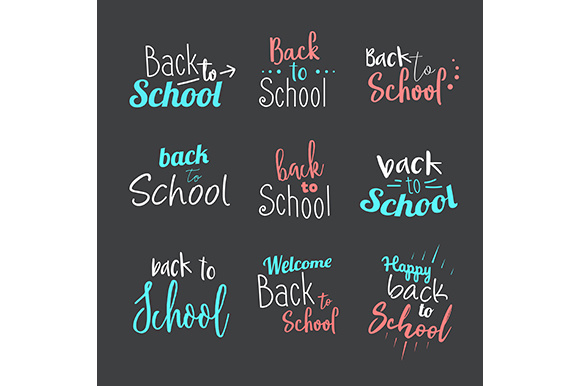
Back to School Designs for Creative Projects
Every season brings a wave of themed content, but few themes offer the same blend of nostalgia, structure, and creative opportunity as back to school. Whether you are preparing classroom materials, launching a seasonal marketing campaign, or building a personal project that captures the energy of September, the right visual foundation matters. That is where Back to School Designs becomes a practical asset rather than just another graphics pack.
What the ZIP Folder Delivers and Why It Works
The Back to School Designs 1 ZIP Folder contains two core files: one JPG and one EPS. This combination serves a wide range of workflows. The JPG gives you an immediate preview, a ready-to-place image for social media posts, blog headers, or simple print projects where resolution is sufficient. The EPS file, by contrast, offers scalable vector artwork that can be edited, recolored, resized, and incorporated into larger layouts without losing quality.
From a practical standpoint, having both formats eliminates friction. You can drop the JPG into a presentation or newsletter within seconds, while handing the EPS to a design team or opening it in your own vector software for deeper customization. This dual-format approach respects different skill levels and time constraints. A busy entrepreneur who needs a quick flyer can use the JPG immediately. A meticulous designer building a full campaign can unpack the EPS layer by layer.
For Educators and Classroom Creators
Teachers and homeschool parents often need visuals that are clear, welcoming, and age appropriate. The Back to School Designs can anchor bulletin boards, lesson slides, worksheets, and classroom signage. Because the EPS file allows color adjustments, you can align the design with your classroom theme or school colors. Consider using the design as a central element on a weekly schedule poster, a reading corner sign, or a welcome banner for open house night. The key is to keep the message direct and the imagery supportive of learning, not distracting.
For Small Business Owners and Marketers
Seasonal promotions around back to school represent a significant revenue window for retailers, service providers, and local businesses. If you run a tutoring center, a bookstore, or even a café near a school district, the design can appear on flyers, social media graphics, email headers, and in-store signage. The EPS file lets you overlay your own text, change background shades, or incorporate your logo seamlessly. A tutoring service might use the design to announce a fall semester schedule, while a stationery shop could feature it on a postcard campaign highlighting classroom essentials.
For Freelance Designers and Content Creators
When you work with multiple clients across different industries, having a reliable design asset on hand saves time. The Back to School Designs folder gives you a starting point that can be adapted to various brand voices. For a playful children’s brand, you might keep the colors bright and the composition busy. For a more professional education client, you could simplify the palette and use the design as a subtle background element. The vector format makes these transformations quick, which helps you deliver on tight deadlines without sacrificing quality.
Practical Applications Across Platforms and Formats
Adapting the same design to different formats does not require starting from scratch. The JPG version works well for square social media posts, Instagram Stories, and Pinterest pins where file size and compatibility matter. The EPS version can be exported at any resolution, making it suitable for large banners, business cards, sticker sheets, or even merchandise like tote bags and notebooks.
If you are producing a series of blog posts around school readiness, study tips, or classroom organization, use the design as a consistent visual thread. Place it at the top of each article, crop it for featured images, or extract individual elements to create custom icons. Consistency in visual language builds recognition and trust with your audience, especially when content spans multiple weeks or platforms.
Maintaining Clarity and Consistency
One common mistake when working with themed designs is overcomplicating the layout. The design elements in the pack are meant to evoke the back to school spirit without overwhelming the message. When you add text, keep it legible. When you combine the design with other graphics, leave enough white space. If you are using the EPS to create variations, limit your color palette to two or three tones that complement the original artwork. This approach preserves the intended mood while allowing for brand-specific tweaks.
Digital vs. Print Considerations
The JPG file is typically sufficient for digital use, but check its resolution if you plan to print at a large size. The EPS vector file gives you the flexibility to output at any dimension, from a small sticker to a full poster, without pixelation. For print projects such as flyers, brochures, or banners, always use the vector file and convert text to outlines when exporting. For on-screen projects, the JPG saves time and keeps file sizes manageable.
Brand Alignment and Audience Fit
Not every audience responds to the same visual style. A design that appeals to elementary school parents might feel too juvenile for college prep materials. The EPS file allows you to adjust saturation, remove elements, or combine the design with more sophisticated typography. If your brand uses a minimalist aesthetic, you can strip the design down to its simplest form. If your brand is bold and colorful, you can layer in additional textures or patterns. The design is a foundation, not a finished product, and that is where its real value lies.
Staying Original While Using a Ready-Made Asset
Some creators worry that using a pre-made design will make their work look generic. Originality comes from how you apply and combine the asset, not from whether you drew every pixel yourself. Pair the Back to School Designs with your own photography, custom typography, or hand-drawn accents. Use the EPS as a background layer behind your own content. Mix it with other compatible design elements to create a composition that feels unique to your brand. The goal is to save time on the foundational visuals so you can invest more energy into the message and strategy.
Practical Recommendations for First-Time Users
Open the EPS file in vector software such as Adobe Illustrator, Affinity Designer, or Inkscape. Explore the layers to understand how the design is built. Experiment with color swaps, scale changes, and rotation before committing to a final layout. Export a few test versions in different formats and review them on the intended medium. If you are new to vector editing, start with the JPG and focus on placement, cropping, and overlaying text. As your comfort grows, move into the EPS for more control.
For teams, the folder structure itself is a small but useful detail. Keeping the JPG and EPS together ensures that anyone picking up the project later can find both the quick reference and the editable master file. Name your exported versions clearly so you do not lose track of which file corresponds to which campaign or client.
Bringing the Design Into a Full Campaign
A single design can anchor an entire seasonal campaign if you plan ahead. Use the JPG for early announcements and teasers. Build the EPS into email templates, website headers, and printed mailers. Create a color variation for each week of the campaign to keep visuals fresh while maintaining brand continuity. Pair the design with complementary patterns or icons that reinforce the theme without repeating the exact same graphic everywhere.
If you are working with a content calendar, schedule your design variations in advance. This ensures that each piece of content feels intentional and connected. A unified visual thread across blog posts, social media, and email builds momentum and makes your audience more likely to engage with your message.
Final Thoughts on Making the Most of This Resource
The strength of Back to School Designs lies in its simplicity and adaptability. It gives you a professional starting point without locking you into a single use case. Whether you are an educator preparing for the new term, a business owner launching a seasonal promotion, or a designer looking for a reliable asset to include in your toolkit, the JPG and EPS files cover the essential bases. Invest a little time in customizing the vector file to your needs, and the result will feel both polished and personal.