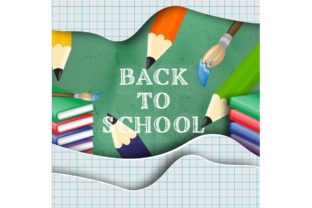
Back to School Digital Paper Textures for Creative Projects and Everyday Printables
There is something about the back-to-school season that stirs a creative itch. Maybe it is the sight of fresh notebooks, the smell of pencil shavings, or the way everything feels like a new beginning. Whether you are a teacher setting up your classroom, a parent organizing school supplies, or a small business owner preparing content for the season, having the right visual tools makes a difference. That is where a set like Back to School Digital Paper Textures comes in. These are not just patterned images. They are versatile design assets that bring warmth, nostalgia, and practicality to a wide range of projects.
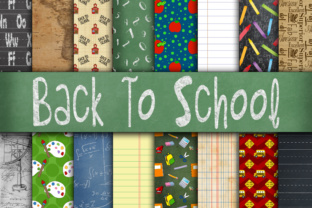
This particular collection includes 16 digital paper textures in a standard 12 x 12 inch format, saved as JPEG files at 300 DPI. That resolution ensures crisp printing and sharp digital display, which is important whether you are working on something that will stay on a screen or go through a printer. The size is generous enough to allow for cropping, resizing, and layering without losing quality. But rather than listing features, let us talk about where these papers actually shine in real life.
What These Digital Papers Are Meant For
At their core, these textures are designed to mimic the look and feel of physical scrapbook paper, but in digital form. They come with patterns and tones that evoke school-themed imagery: pencils, apples, chalkboard textures, lined notebook pages, alphabets, and other classroom motifs. Some might be subtle and neutral, while others are playful and colorful. This range makes them suitable for everything from formal school communications to whimsical party decor.
Because they are digital, you avoid the mess of cutting, gluing, or running out of a specific pattern mid-project. You can use them over and over, scale them up or down, and combine them with other elements without worrying about paper grain or ink bleeding. That flexibility is often what draws people to digital textures in the first place.
Teachers and Educators Building Classroom Materials
If you have ever stepped into a classroom in August, you know how much effort goes into making the space feel inviting. Bulletin boards, name tags, schedule cards, and subject labels all benefit from cohesive, themed backgrounds. With Back to School Digital Paper Textures, a teacher can print out lined-paper patterns for a writing center, use chalkboard-style textures for a word wall, or create matching drawer labels that make the room feel organized rather than chaotic.
Beyond the physical classroom, these textures work well for digital resources shared with students and parents. A weekly newsletter becomes more engaging when it sits on a subtle notebook-paper background. A homework tracker or reading log feels less like a chore when it is printed on a cheerful apple-patterned sheet. Teachers who create their own worksheets, flashcards, or classroom posters can use these textures as borders, headers, or full-page backgrounds to add visual interest without distracting from the content.
Parents Planning School-Themed Celebrations
The back-to-school season is not just about classrooms. Many families mark the occasion with small celebrations: a first-day-of-school breakfast, a photo backdrop, or a gathering with neighborhood kids. Digital papers make it easy to create custom invitations, thank-you notes, and decorations that feel personal. A bunting banner made from these textures can be printed, cut, and strung across a doorway. Cupcake toppers and place cards become quick projects when you have a set of coordinated designs ready to go.
Some parents also use these textures for memory keeping. Scrapbooking the first day of school is a tradition for many families, and having digital papers that match the theme saves time and ensures a cohesive look from year to year. You can build a digital album or a physical scrapbook layout using the same textures across multiple pages, creating a consistent visual story.
Small Business Owners and Creative Entrepreneurs
If you run an Etsy shop, a stationery brand, or a print-on-demand business, seasonal digital papers are a practical asset. You can use them to design custom planners, sticker sheets, notepads, and greeting cards that appeal to parents and teachers shopping for the school year. The 300 DPI resolution ensures your products look professional when printed, which matters when customers expect quality.
Social media content is another area where these textures add value. A simple quote graphic becomes more eye-catching when placed on a textured background that evokes the school theme. You can create Instagram posts, Pinterest pins, or Facebook covers that feel timely and polished without needing a full graphic design suite. For anyone creating digital products for teachers or parents, these textures serve as a ready-made foundation that speeds up the design process.
Event Planners and Volunteer Organizers
School events like open houses, parent-teacher conferences, and fundraisers often require signage, programs, and promotional materials. Volunteers who coordinate these events may not have design experience, but they can still produce attractive materials with the right templates. Back to School Digital Paper Textures can be used as backgrounds for flyers, donation envelopes, or volunteer sign-up sheets. A little visual consistency goes a long way in making an event feel organized and welcoming.
Practical Considerations Before You Start Using Them
While digital papers are easy to work with, there are a few things worth keeping in mind. First, check the licensing if you plan to sell items made with these textures. Many digital paper sets allow commercial use, but terms vary. If you are creating products for sale, confirm that the license covers your intended use.
Second, consider the color palette. While the school theme is obvious, the specific colors in this set might lean bright, muted, or traditional. If you are working on a project that needs to match a specific school color or brand, you may need to adjust the textures in editing software or layer them with other elements. The 12 x 12 size gives you plenty of room to crop and reposition, but color tweaks are easier if you have basic familiarity with photo editing tools.
Third, think about the medium. For digital use, these JPEGs work beautifully on screens. For print, the 300 DPI ensures good quality, but the final result depends on your printer and paper type. A test print is always a good idea, especially if you are producing multiple copies of something like invitations or labels.
Strengths and Limitations Worth Noting
One of the strongest aspects of this collection is the variety. Having 16 different textures means you are unlikely to repeat the same look across a project, which keeps things fresh. The school theme is broad enough to cover multiple sub-themes: vintage classroom, modern minimal, colorful and playful, or neutral and professional. That range makes the set useful for more than just one type of project.
Another strength is the file format. JPEGs are universally compatible, so you do not need specialized software to open them. Any computer, tablet, or phone can handle them, and most design programs accept JPEGs without issues. For someone who is not deeply technical, that simplicity is a relief.
On the limitation side, JPEGs are not inherently editable the way layered files like PSDs are. You cannot easily remove a pattern element or change a color without some manual work. If you are used to working with vector graphics or layered templates, you might find JPEGs less flexible. Also, because these are paper textures, they are intended as backgrounds or accents rather than standalone illustrations. You will likely want to pair them with other design elements like text, photos, or clip art to complete a project.
How Different Users Get the Most Out of Them
A teacher might print these textures on sticker paper to create custom labels for folders and notebooks. A parent could import them into a photo editing app to design a digital scrapbook page for their child's first day. A small business owner might use them as product photography backdrops, placing school supplies on top of the printed textures for a styled flat lay. A volunteer coordinator could embed them into a Canva template for a school event flyer, instantly giving it a polished look without starting from scratch.
The beauty of digital papers is that they are adaptable. One person uses them for print, another for screen. One person wants subtle texture, another wants bold pattern. The same set can serve both needs because the 16 designs offer enough variety to cover different aesthetics.
It is also worth noting that these textures are not limited to the back-to-school season. Many of the patterns, especially the more generic ones like lined paper or chalkboard textures, work year-round for educational content, homeschool materials, or office organization projects. That extends their usefulness beyond August and September, making them a practical investment rather than a seasonal novelty.
Final Observations on Using Digital Textures Well
If you are considering a set like Back to School Digital Paper Textures, think about the projects you actually have coming up. Do you need to create classroom signs? Are you planning a first-day-of-school photo shoot? Do you sell printables or stationery? Matching the textures to your specific workflow is what makes them valuable rather than just decorative.
Start with one or two textures that fit the tone you want, then build from there. Layering a subtle texture behind text keeps readability high while adding depth. Using a bolder pattern as an accent on a border or header draws attention without overwhelming the page. With 16 options at hand, you have room to experiment and find what works best for your style and your audience.
Whether you are preparing for the school year, building a creative business, or simply enjoying a seasonal project, these digital papers offer a practical starting point. They save time, reduce waste, and add a cohesive look that ties your work together. And at the end of the day, that is what good design resources do: they make your job easier while making the result look like it took more effort than it actually did.